In a world where our smartphones have become extensions of ourselves, understanding the intricate details of the device in your pocket can feel like navigating a maze. The "My Android" app, developed by InnovationM, aims to demystify your phone by offering a comprehensive dashboard of its hardware and software specifications . With over 120,000 reviews on the Google Play Store and a solid 4.4-star rating , it's clear that many users appreciate having a central hub for their device's vital statistics.
At its core, the app functions as a powerful system information tool. It provides a simple, neatly organized list of every application installed on your phone, allowing you to easily search, sort, and even launch or uninstall apps directly from the interface . Beyond just apps, it offers a deep dive into your hardware, detailing available memory for both the internal phone storage and the SD card. This immediate, visual breakdown of storage is incredibly useful for quickly identifying why your phone might be running low on space .
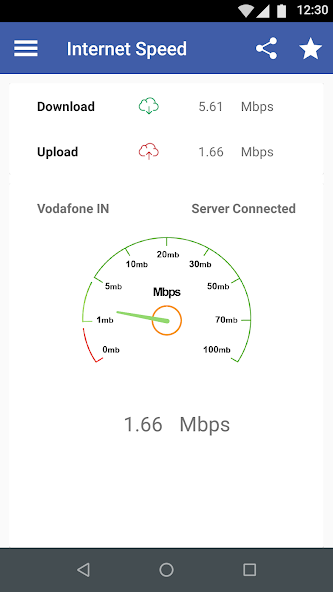
Connectivity is another major focus. The "My Android" app includes features to monitor your internet data usage across both mobile and Wi-Fi networks . In an age where data plans are precious, this built-in monitor can help you stay on top of your consumption and avoid overage charges. Furthermore, it boasts an internet speed test feature, allowing you to verify the performance of your service provider directly from the app . This can be handy for troubleshooting slow connections or simply confirming you're getting the speeds you pay for.
But the app's utility extends far beyond simple system monitoring. It serves as a detailed encyclopedia of your phone's capabilities:
- Camera & Display: It reveals the megapixel count of both your front and back cameras and, more interestingly, estimates the number of photos you can take based on your camera's megapixels and remaining phone memory . It also provides precise details on screen size, resolution in pixels, and screen density .
- System & Hardware: You can quickly find crucial system information like total device RAM, the specific Android version name and number (e.g., Android 14), and the manufacturer and model number of your device .
- Key Features: It even offers a quick guide on how to take a screenshot on your specific phone model, which can be a surprisingly helpful feature for less tech-savvy users .
The app's developer has also shown a commitment to evolving the user experience. A recent exciting update introduced a gaming section, allowing users to play multiple games right within the "My Android" app . This addition, alongside promises of a performance boost and a smoother experience, suggests a shift towards making the app a more engaging and versatile platform, not just a dry system utility .
The user feedback paints a picture of a highly useful app, but it's not without its criticisms. Many users praise its clean interface and comprehensive information, calling it an excellent and responsive tool for learning about their device . One user even noted its value in a crisis, helping them manage apps after a phone reset .
However, a recurring pain point for some is the presence of advertisements. Several reviews from both the English and Russian-speaking user bases mention frequent, full-screen ads that interrupt the experience . Some users find these ads intrusive enough to uninstall the app, suggesting that the ad model might be a significant drawback for a segment of its audience .
In conclusion, "My Android" successfully positions itself as an essential utility app for any Android user. It brilliantly fulfills its primary purpose of providing a clear, centralized, and easy-to-understand overview of a device's hardware and software. While the integrated ads and occasional feature requests (like a call log analyzer, as seen in older reviews) are points of discussion, the core value proposition is strong. For users who want to become more acquainted with their device's innards or simply need a reliable tool to monitor performance and storage, "My Android" offers a compelling, all-in-one solution that continues to grow and adapt.