Smartphones have become an essential part of daily life, storing personal photos, private messages, financial information, work documents, and important accounts. Losing a phone or allowing unauthorized access can expose sensitive information and create security risks. CrookCatcher is a mobile security application designed to provide an additional layer of protection by detecting suspicious unlock attempts and helping users identify who may be trying to access their device.
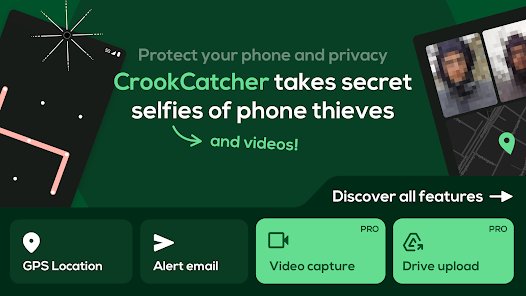
CrookCatcher works like a security guard for your smartphone. When someone enters an incorrect PIN, password, or pattern, the application can capture a photo of the person attempting to unlock the device. This feature can help users gather evidence when their phone is lost, stolen, or accessed without permission.
Main features of CrookCatcher include:
- Captures photos after failed unlock attempts
- Detects unauthorized access attempts
- Sends security alerts
- Provides location information
- Runs automatically in the background
- Helps identify people trying to access your phone
- Adds extra protection beyond standard screen locks
One of the most useful features of CrookCatcher is that it combines image capture with location tracking. Instead of only knowing that someone attempted to access your device, users can receive additional details that may help them understand where the attempt happened. This makes the app useful for situations involving lost phones, theft, or unauthorized access.
The application also provides advanced security options for users who need stronger protection. These features allow users to collect more detailed evidence and customize how the app responds to suspicious activity.
Advanced protection features include:
- Video recording with sound support
- Cloud storage options for captured evidence
- Custom security messages
- Additional privacy settings
- Enhanced monitoring features
- Improved protection against unauthorized access
CrookCatcher is designed to work efficiently without constantly consuming phone resources. It remains inactive during normal usage and only activates security features when it detects failed unlock attempts. This approach helps reduce battery usage while still providing protection when it is needed.
The app can be useful for many types of smartphone users, including travelers, students, professionals, and anyone who stores valuable information on their device. Modern phones contain important personal and business data, making additional security tools valuable for protecting privacy.
Users who may benefit from CrookCatcher include:
- People worried about smartphone theft
- Travelers carrying phones in public places
- Business users protecting confidential information
- Users who want extra security monitoring
- Anyone looking for more protection than a regular screen lock
Privacy is an important part of any security application. CrookCatcher gives users control over its security settings and permissions. Like any application that uses camera and location features, users should review permissions carefully and configure the app according to their personal privacy preferences.
Overall, CrookCatcher is a useful security application that provides additional protection for Android users. While strong passwords and screen locks remain important, having a tool that can capture evidence and provide alerts during suspicious activity can improve device security.
Key benefits of CrookCatcher:
- Protects your phone from unauthorized access
- Captures evidence of failed unlock attempts
- Provides security alerts
- Helps locate your device
- Offers advanced protection features
- Works automatically in the background
With increasing concerns about smartphone privacy and security, applications like CrookCatcher demonstrate how mobile technology can help users protect their personal information and maintain greater control over their devices.