We live in a world where our smartphones are extensions of our lives. They hold our most private conversations, sensitive photos, and personal data. Yet, we often use them in crowded places—on the subway, in coffee shops, or at the office—where a curious glance from a stranger or a snooping friend can easily compromise our privacy. This is where a tool like Hide Screen - Screen Guard steps in. It's more than just a screen dimmer; it's a comprehensive privacy suite designed to protect your digital life from prying eyes, one feature at a time.
The Core Problem: Visual Privacy on the Go
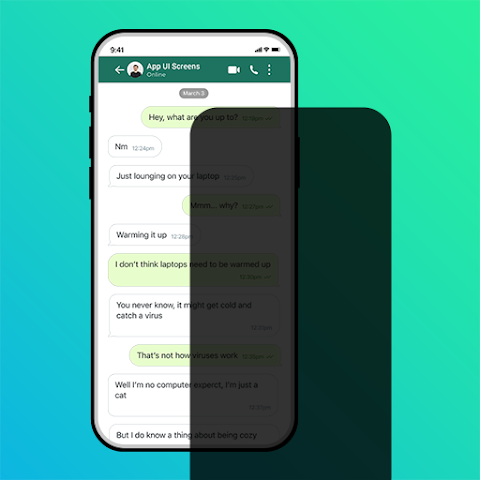
Have you ever felt that uncomfortable feeling when someone sitting next to you can clearly see your screen? Whether it's a private chat, a banking app, or just your browsing history, that feeling of being watched is intrusive. Hide Screen tackles this problem head-on with its primary feature: a customizable screen filter. This isn't just a simple brightness adjustment. You can place a movable, resizable overlay on your screen that acts like a privacy shield, darkening or hiding specific areas. Think of it as a physical privacy screen for your digital content, allowing you to decide exactly what is visible and what remains hidden from those around you.
Beyond the Filter: A Full Suite of Privacy Tools
The genius of Hide Screen is that it doesn't stop at just dimming your display. It offers a multifaceted approach to mobile privacy, acting as a central command center for what others can and cannot see. This makes it a versatile tool for a variety of situations. Here are some of its standout capabilities:
- App Hiding: You can discreetly hide selected apps from your home screen and app drawer. This is perfect for keeping banking apps, dating profiles, or any other private apps out of sight.
- Parental Lock: This feature allows you to restrict access to specific apps, providing a simple but effective way to keep children or visitors from opening applications you don't want them to see.
- Notification and Call Control: The app can hide notification content and previews on your lock screen and status bar, and can even conceal call logs and messages from specific contacts. This ensures your private communications remain truly private, even when your phone is locked.
How It Works and What to Expect
Using the app is designed to be straightforward. You launch Hide Screen, and you're presented with a clean, easy-to-navigate interface. The central feature is the screen overlay, which functions like a digital "do not disturb" sign for your screen. You can activate it and then adjust its size, color, and opacity to suit your need. For instance, you could make the overlay completely black to hide everything, or simply dim the screen to reduce glare while reading sensitive text. The ability to customize the filter means you can be subtle or use it as a full blackout shield.
A Critical Note on Permissions
Before you download, it's vital to understand one key requirement: the app needs Accessibility Service permission to function fully. This is a standard but significant permission on Android. It allows the app to perform essential actions like drawing overlays on your screen and locking your device. The developer's statement explicitly notes that this permission is required for the screen lock feature and that they do not collect, store, or share any personal data with third parties. While this is a common practice for apps of this nature, it's always a good principle to be aware of the permissions you're granting and to be comfortable with the privacy policy.
Weighing the Pros and Cons
To help you decide if Hide Screen is the right privacy solution, here is a balanced look at its advantages and potential drawbacks.
Pros:
- Comprehensive Privacy: Offers multiple layers of protection beyond just a screen filter.
- Customizable: The overlay's size, color, and opacity are adjustable to fit any scenario.
- User-Friendly: Designed with a simple and intuitive interface for easy setup.
- Specific Controls: Provides granular control, like hiding apps and specific contacts.
Cons:
- Requires Accessibility Permission: A powerful permission that some users may be hesitant to grant.
- No Data Deletion: The Play Store listing indicates that data cannot be deleted, which is worth noting for privacy-conscious users.
- Potential Overlap: Some features may duplicate functions already present in your Android OS.
The Developer and Data Safety
The app is developed by an individual, BABARIYA VIPULBHAI BABUBHAI, under the developer name Nishal Technology, based in India. The developer provides an email address for support. In terms of data safety, the app's listing on the Google Play Store is reassuring. It states that the app does not share any user data with third parties and that it does not collect any personal information. Data is also encrypted in transit, adding another layer of security. However, it is worth noting that under the "Data cannot be deleted" policy, any data that is collected (which they claim is none) cannot be removed, highlighting the importance of understanding and trusting their privacy-first approach.
Final Verdict: A Valued Defender of Digital Privacy
Hide Screen - Screen Guard is a practical and thoughtful tool for anyone who values their digital privacy in public spaces. Its strength lies in its combination of simple, effective features—from its core screen filter to its powerful app and notification-hiding capabilities. While the required accessibility permission is a consideration, the developer's transparent stance on data privacy provides some assurance. If you often find yourself feeling exposed while using your phone in public, this app offers a smart and versatile solution to keep your private life truly private. Just remember to adjust the settings to match your specific needs for the most secure and seamless experience.