In the modern world, our smartphones have become the last thing we see before we close our eyes at night. Whether it's scrolling through social media, reading the news, or watching a video, the glowing screen is a constant companion in the dark. But have you ever noticed that your eyes feel tired, strained, or that you find it harder to fall asleep after a late-night browsing session? The culprit behind this discomfort is often blue light, a specific wavelength of light emitted by our digital devices, and it's a growing concern for millions of users worldwide.
The Science Behind the Strain: What is Blue Light?
The app's description provides a concise and accessible explanation of the problem. It notes that the blue light from phone and tablet screens falls within a wavelength range of 380–550 nm. Scientific research has shown that this type of light can not only cause immediate eye strain and fatigue but is also linked to long-term issues such as retinal damage and an increased risk of age-related macular degeneration (AMD), a leading cause of vision loss.
More immediately, blue light has a powerful effect on our sleep patterns. It suppresses the production of melatonin, the hormone that regulates our sleep-wake cycle (circadian rhythm). When melatonin levels are low, our brains stay alert, and falling asleep becomes a struggle. By filtering out these specific wavelengths, the Blue Light Filter app aims to counteract these effects, helping users reduce eye discomfort and improve their sleep quality after dark.
A Simple Solution: What the App Does
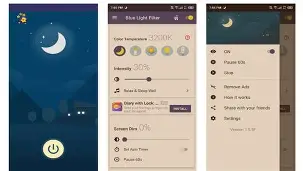
The Blue Light Filter app addresses this problem with a straightforward and effective mechanism: it allows users to adjust their screen's color temperature by applying a warm-toned filter. This overlay reduces the amount of blue light emitted by the display, creating a softer, yellow-orange tint that is much gentler on the eyes. This is the essence of the "night mode" that many phone manufacturers have now built into their operating systems, but this app provides a dedicated, highly customizable, and independent solution for Android devices.
The core features of the application are purposefully simple and user-centric:
- Reduce Blue Light: The primary function is to effectively filter out the harmful portion of the light spectrum.
- Adjustable Filter Intensity: Users can customize the strength of the filter, allowing them to find the perfect balance between eye comfort and screen visibility based on their environment and preference.
- Power Saving: By changing the screen's color output, the app can also contribute to a minor reduction in battery consumption.
- Ease of Use: The app is designed for convenience, allowing users to turn the filter on and off quickly, often with a toggle in the notification panel.
User Experience: Tapping into High Satisfaction
The app's stellar rating of 4.8 stars from nearly 400,000 reviews on the Google Play Store suggests that it successfully fulfills its promise for a vast majority of its users. The feedback consistently highlights its effectiveness in making nighttime reading more comfortable and reducing the sensation of eye fatigue. Many users praise its simplicity and the convenience of being able to control it with a simple tap from the notification shade.
One enthusiastic reviewer noted, "This is really a must-recommend, it's simply too good! You can adjust the light and dark as well as the warm/cool tones yourself." This ability to customize the filter to one's preference is a significant advantage, allowing each user to find the optimal setting for their eyes and environment.
The Accessibility Challenge: A Common Pain Point
However, the most prominent feedback from power users points to a core technical limitation of how such apps function on modern Android systems. To draw a filter overlay over other applications, the app requires the "Accessibility" permission. This is a standard Android requirement, but it comes with a known friction point. As one detailed review explains, "If the accessibility button is on, it is often triggered by mistake, seriously affecting the user experience within the app's page."
The user further elaborates on the dilemma: if you disable the accessibility shortcut, you lose the quick toggle and have to reset the app each time, which is inconvenient. This is a crucial consideration for potential users. This isn't a flaw in the app itself, but a consequence of Android's security design, which the developer cannot bypass. The app description even acknowledges this, advising users to pause the app before installing software from other download platforms or taking screenshots to avoid the filter affecting those specific actions.
Data Privacy and Security: What You Should Know
From a data security perspective, the app's listing provides some key information for the privacy-conscious user. The developer states that they do not share any user data with third parties. This is a strong and reassuring stance. The app may collect certain data types, including app activity, app information, performance data, and device or other IDs. This is often for analytical purposes—to understand how the app is used and improve its performance—rather than for tracking users for advertising.
Furthermore, the app notes that data is encrypted in transit, which is a modern security best practice. Most importantly, you can request that the developer delete your data. However, it's always wise for any user to review the developer's full privacy policy via the provided link to fully understand their data-handling practices before installing any application.
Who is This App For?
This Blue Light Filter app is a fantastic choice for a wide range of smartphone users. It is especially beneficial for those who:
- Read, browse, or watch videos in bed at night: It can significantly reduce eye strain and make the screen more comfortable to view in the dark.
- Experience difficulty falling asleep after using their phone: The filter can help improve sleep quality by supporting natural melatonin production.
- Suffer from eye fatigue or headaches after prolonged screen use: The warm light is softer on the eyes and can provide noticeable relief.
- Use their phone in environments with very low ambient light: Even for a few minutes, the filter can make a difference.
For users who prefer not to rely on the built-in night mode on their phone—or who want more granular control over the filter's intensity—this app offers a valuable alternative.
Conclusion: A Proven and Potent Tool for Digital Wellbeing
The Blue Light Filter app is a testament to how a focused, utility-driven application can be a boon for digital wellbeing. By directly addressing a modern health concern—the impact of screen light on eye health and sleep—it has garnered a loyal and appreciative user base. Its high ratings and positive reviews highlight its effectiveness and the value users place on its customizable features.
While the requirement for the Accessibility permission introduces a minor friction point for some users, this is a limitation of the Android platform itself and not a flaw of the app. For the vast majority, the simple ability to toggle a warm, eye-friendly filter with a single tap from the notification bar is the primary draw. Ultimately, if you are among the millions who spend time on their phones in the evening, this app is a simple, free, and highly effective tool to protect your eyes and promote a better night's sleep.